

ElcoMaster® Oven Profiling Software
ElcoMaster® is the easy to use software application designed specifically for the set up and assessment of your oven & product temperature profile, generating professional reports in seconds.

- Summary
-
Summary
-
Maximise coating quality and efficiency with the Elcometer 215 Oven Profiling System and intelligent ElcoMaster® Software App.
Simple to Set Up
Set up the profile requirements in ElcoMaster® Data Management Software using the Paint Manufacturer’s Datasheet and send to the Elcometer 215 Oven Logger via USB or Bluetooth®.
Provide a comprehensive inspection report and win future contracts, whatever standard you work to:
- Qualicoat
- ISO9001
- CQ1-12
- QIB
- GSB
Elcometer 215 Oven Temperature Profiling System
The Elcometer 215 Oven Temperature Profiler acts as an objective and accurate witness to the curing process in a powder coating oven.
-
- Key Features
-
Key Features
ElcoMaster® Oven Profiling Software
Analyse with ElcoMaster®
ElcoMaster® is the easy to use software application designed specifically for the set up and assessment of your oven & product temperature profile, generating professional reports in seconds.
Simple to Set Up
Set up the profile requirements in ElcoMaster® Data Management Software using the Paint Manufacturer’s Datasheet and send to the Elcometer 215 Oven Data Profiler via USB or Bluetooth®.
Logger Setup Parameters
- Sample rate
- Trigger start
- Probe type
Paint Setup Parameters
- Paint description
- Manufacturer
- Upload datasheet
- Cure parameters
- Min, mid, max cure temperature & time
- Cure curve type
- Cure temperature limits
- Max absolute temperature above which damage occurs
- Min crosslink temperature at which curing occurs
Product/Probe Plans
- Image import
- Probe placement by channel
- Identification name & image map marker
- Direction of travel
- Product description
Logger Profile Uploads
- Select logger setup
- Select paint setup
- Select product / probe plan
- Upload to gauge
Advanced Analysis
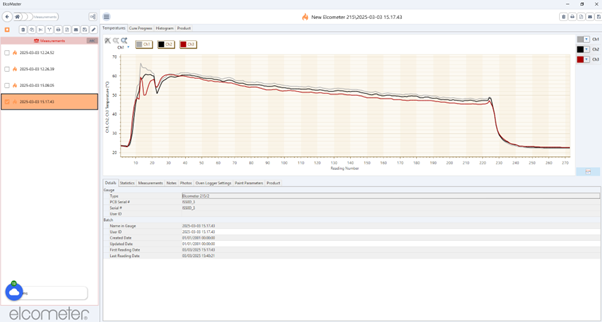
By providing detailed thermal profiles, the Elcometer 215 Oven Temperature Profiler, in conjunction with the ElcoMaster® data management software, allows operators to optimise oven settings for each coated product, improving fuel efficiency and ensuring high quality finishes.

Details
- Graphs
- Temperature by channel
- Cure progress by channel
- Histogram
- Product
- Gauge
- Type
- PCB serial #
- Serial #
- User ID
- Batch
- Name in gauge
- User ID
- Create date
- Updated date
- First reading date
- Last reading date
Statistics
- Mean, maximum, minimum
- Standard deviation
- Coefficient of variation
- Peak difference (across all channels)
- Time of peak difference (other)
- Cure value
- Cure pass/fail
- Cure start time
- Cure finish time
- Time above max absolute temperature
- Maximum temperature status
- Time above crosslink temperature
- Time above max temperature
- Time above mid temperature
- Time above min temperature
Measurements
- Reading number
- Channel temperature
- Notes
- Photos
- Oven logger settings
- Logger
- Sample interval
- Probe type by channel
- Triggers
- Start trigger
- Stop trigger
- Cure points (time/temperature)
- Logger
- Paint Parameters
- Date saved
- Paint manufacturer name
- Paint name & description
- Max absolute temperature
- Min crosslink temperature
- Number of cure points
- Curve type
-
- Downloads
-
Downloads
-

ElcoMaster® Oven Profiling Software - Datasheet
-
-
ElcoMaster® Oven Profiling Software
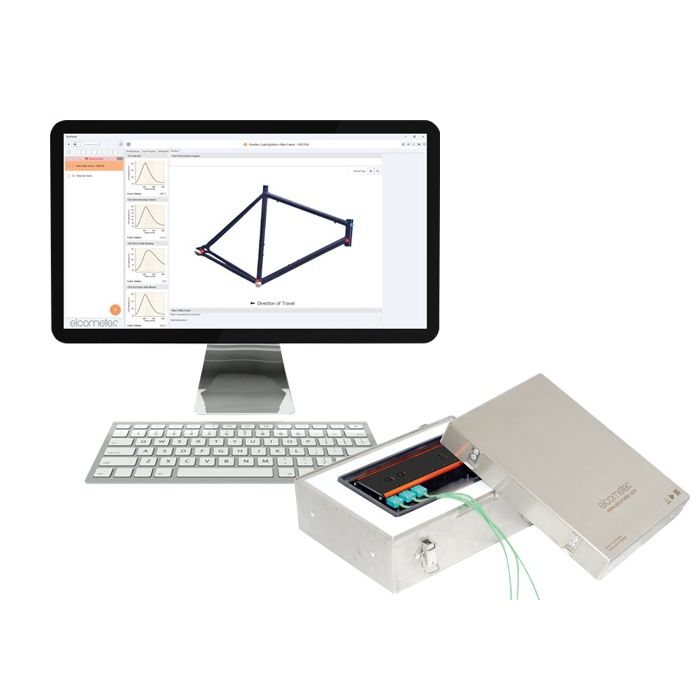
ElcoMaster® is the easy to use software application designed specifically for the set up and assessment of your oven & product temperature profile, generating professional reports in seconds.
Summary
ElcoMaster® Oven Profiling Software
Maximise coating quality and efficiency with the Elcometer 215 Oven Profiling System and intelligent ElcoMaster® Software App.
Simple to Set Up
Set up the profile requirements in ElcoMaster® Data Management Software using the Paint Manufacturer’s Datasheet and send to the Elcometer 215 Oven Logger via USB or Bluetooth®.
Provide a comprehensive inspection report and win future contracts, whatever standard you work to:
- Qualicoat
- ISO9001
- CQ1-12
- QIB
- GSB
Elcometer 215 Oven Temperature Profiling System
The Elcometer 215 Oven Temperature Profiler acts as an objective and accurate witness to the curing process in a powder coating oven.
Key Features
ElcoMaster® Oven Profiling Software
Analyse with ElcoMaster®
ElcoMaster® is the easy to use software application designed specifically for the set up and assessment of your oven & product temperature profile, generating professional reports in seconds.
Simple to Set Up
Set up the profile requirements in ElcoMaster® Data Management Software using the Paint Manufacturer’s Datasheet and send to the Elcometer 215 Oven Data Profiler via USB or Bluetooth®.
Logger Setup Parameters
- Sample rate
- Trigger start
- Probe type
Paint Setup Parameters
- Paint description
- Manufacturer
- Upload datasheet
- Cure parameters
- Min, mid, max cure temperature & time
- Cure curve type
- Cure temperature limits
- Max absolute temperature above which damage occurs
- Min crosslink temperature at which curing occurs
Product/Probe Plans
- Image import
- Probe placement by channel
- Identification name & image map marker
- Direction of travel
- Product description
Logger Profile Uploads
- Select logger setup
- Select paint setup
- Select product / probe plan
- Upload to gauge
Advanced Analysis
By providing detailed thermal profiles, the Elcometer 215 Oven Temperature Profiler, in conjunction with the ElcoMaster® data management software, allows operators to optimise oven settings for each coated product, improving fuel efficiency and ensuring high quality finishes.
Details
- Graphs
- Temperature by channel
- Cure progress by channel
- Histogram
- Product
- Gauge
- Type
- PCB serial #
- Serial #
- User ID
- Batch
- Name in gauge
- User ID
- Create date
- Updated date
- First reading date
- Last reading date
Statistics
- Mean, maximum, minimum
- Standard deviation
- Coefficient of variation
- Peak difference (across all channels)
- Time of peak difference (other)
- Cure value
- Cure pass/fail
- Cure start time
- Cure finish time
- Time above max absolute temperature
- Maximum temperature status
- Time above crosslink temperature
- Time above max temperature
- Time above mid temperature
- Time above min temperature
Measurements
- Reading number
- Channel temperature
- Notes
- Photos
- Oven logger settings
- Logger
- Sample interval
- Probe type by channel
- Triggers
- Start trigger
- Stop trigger
- Cure points (time/temperature)
- Logger
- Paint Parameters
- Date saved
- Paint manufacturer name
- Paint name & description
- Max absolute temperature
- Min crosslink temperature
- Number of cure points
- Curve type